PGP Settings
In order to read PGP-encrypted emails and send encrypted emails, the app must have access to the public and private keys. This form is used to add or delete keys.
Note: Only ASCII formats can be read.
Public keys
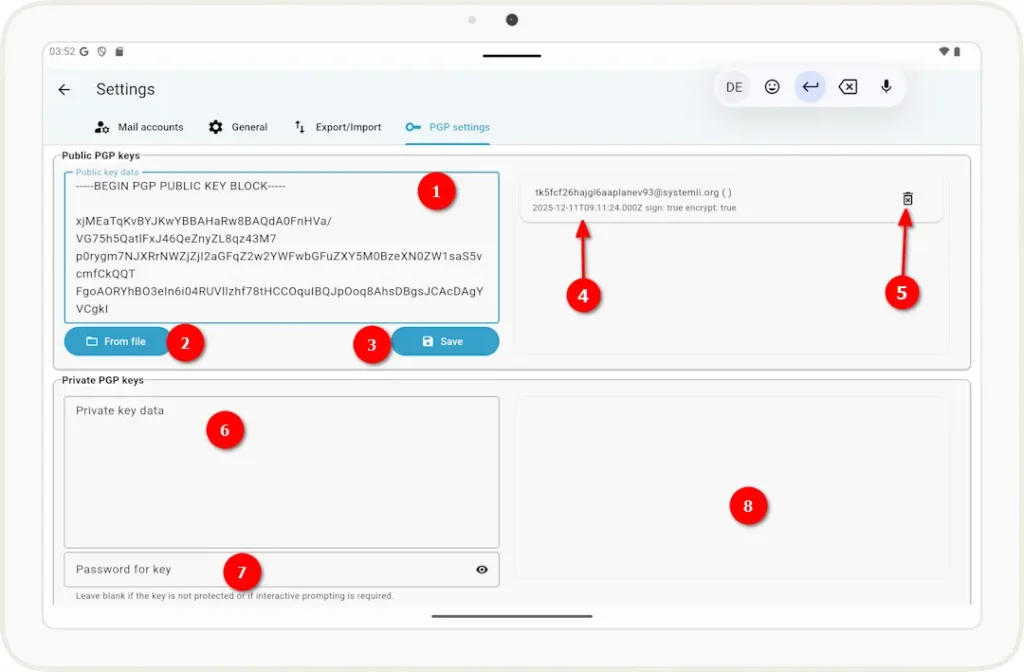
1 The key is displayed in the text box. You can also paste a key from the clipboard here.
2 Click this button to import a key from a file using a file dialog.
3 Once you’ve entered a key, you must save it using this button.
4 This list displays the public keys that have already been entered.
5 You can delete an existing key by clicking this icon.
Private keys
6 As in steps 1 and 2, a private key is inserted here.
7 If the key is password-protected, you must enter the password here.
8 Similar to steps 4 and 5, the private keys are displayed here and can be deleted.