List of Email Accounts
The list of email accounts displays all the accounts you have registered or imported. The email folders for the active email account are displayed.
Sorting
: You can sort the list manually by tapping and holding the name of an email account. Then drag the account to the desired location.
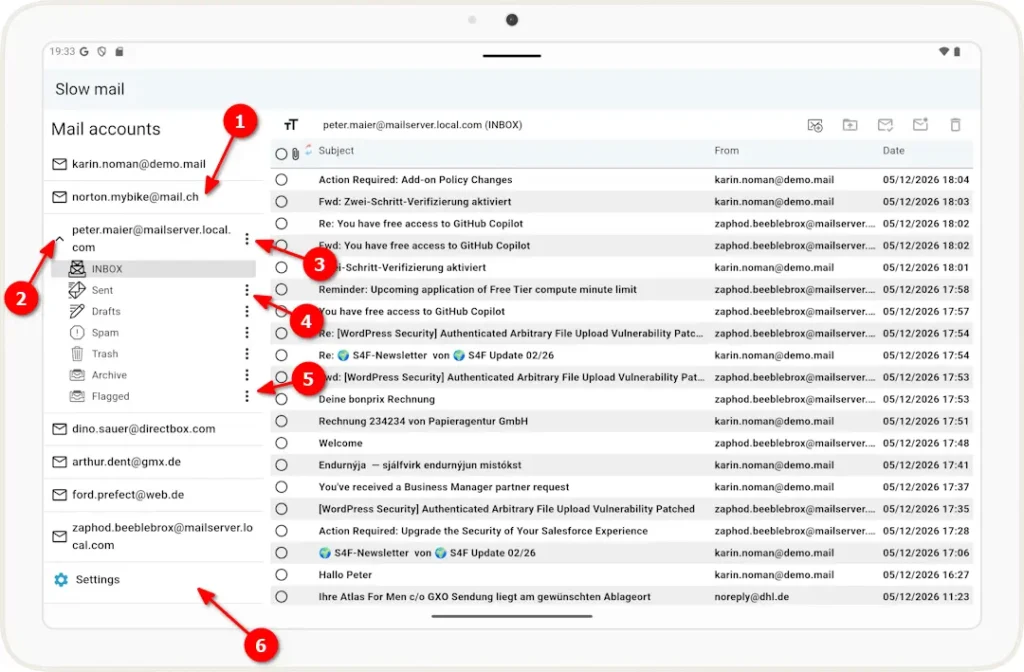
1 Open an email account by tapping the account name.
2 When an email account is open, you can use the arrow to expand or collapse the list of folders.
3 Clicking the ( ) next to the account name opens a pop-up menu that allows you to create subfolders at the top level.
4 When you click () next to the default folder specified by the email provider, a pop-up menu opens, offering the option to create a subfolder within it or to permanently delete all emails in the folder.
5 Using the () on folders you have created yourself, you can rename the folder or delete the folder and its contents (provided it does not contain any subfolders), in addition to the options listed under (4).
6 You can use this option to open the settings window.