General Settings
You can use this form to change settings that control the app's general behavior.
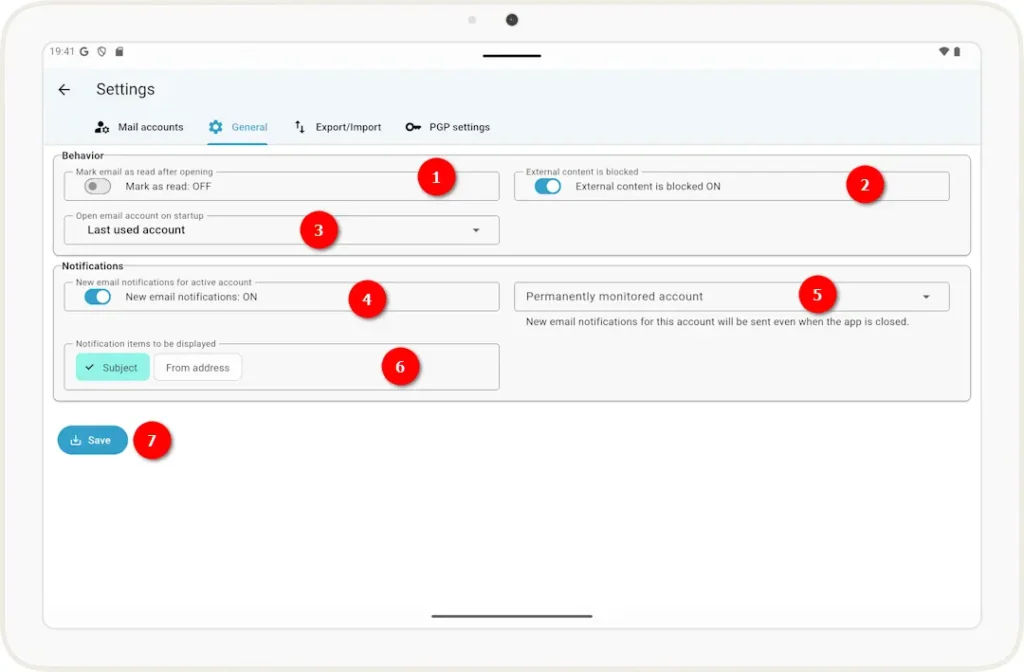
1 Enable or disable the option to automatically mark an email as read when you open it.
2 When viewing emails, you can prevent external content (such as images) from loading. Use this toggle to set the default behavior.
Note: Once the email is open, you can also change this setting individually for that specific email at any time.
3 Use this dropdown menu to select what should happen when the app starts. You can choose between:
– Do not open an account
– Open the last account
used – Always start with the account selected from the list
4 You can enable a notification to be sent whenever a new email arrives in the inbox of the currently open email account.
5 If you select an email account here, the app will attempt to send you notifications about new emails for that account even when the app is not open.
Note: Not all versions of Android allow notifications to be sent when the app is closed; in that case, this setting will have no effect.
6 When the app sends a notification, you can select here which information should be included in the notification.
7 Changes will not take effect until they have been saved using this button.